

Categories
Create Advanced Excel Dashboards with Formulas, VLOOKUP & Interactive Charts
Turn messy spreadsheets into powerful, automated Excel dashboards that give you instant clarity, smarter decisions, and total control over your data.
If your data feels overwhelming, I’ll transform it into clean, visual, and intelligent reports that actually drive results.
Are you drowning in spreadsheets?
Struggling with manual reports, confusing formulas, broken VLOOKUPs, or outdated Excel files that take hours to update?
You’re not alone.
Most businesses collect data. Very few actually use it effectively.
That’s where I come in.
I design advanced Excel dashboards with powerful formulas, VLOOKUP/XLOOKUP, Pivot Tables, automation, and dynamic charts that turn raw data into clear insights — instantly.
Whether you're tracking sales, expenses, KPIs, inventory, performance metrics, or financial data, I build dashboards that are:
Automated
Accurate
Visually compelling
Easy to use
Built for real business decisions
This isn’t basic spreadsheet work. This is strategic Excel engineering.
I provide custom-built Excel dashboards and reports tailored specifically to your business needs.
My services include:
✔ Advanced Excel formulas (IF, INDEX-MATCH, XLOOKUP, SUMIFS, COUNTIFS, OFFSET, etc.)
✔ VLOOKUP / XLOOKUP integration for dynamic data linking
✔ Pivot Tables & Pivot Charts
✔ Interactive Excel dashboards
✔ Dynamic charts & data visualization
✔ Data cleaning and structuring
✔ Automated reporting systems
✔ KPI tracking dashboards
✔ Financial modeling support
✔ Excel performance optimization
Every dashboard is:
Clean and professional
Fully automated where possible
Easy to update
Built for scalability
Designed with business logic, not just formatting
Unlike generic Excel gigs, I don’t just “add charts.”
I design systems that reduce errors, save hours of work, and support smarter decisions.
No more scanning rows of raw numbers.
You’ll see your performance in seconds through dynamic graphs, trend lines, and KPI indicators.
Manual reports waste time. My dashboards automate calculations so you can:
Update data with one click
Eliminate repetitive work
Reduce spreadsheet errors
Time saved = productivity gained.
With properly structured formulas and lookup systems, you’ll avoid:
Incorrect totals
Broken references
Duplicate calculations
Misaligned data
Better data → Better decisions → Better profits.
A polished Excel dashboard builds authority.
Whether you’re presenting to investors, managers, or clients, your reports will look professional and strategic — not amateur.
If your Excel file is:
Slow
Messy
Confusing
Overloaded with inconsistent formulas
I’ll restructure it into a clean, high-performance system.
You’ll know your numbers are accurate, structured, and reliable.
No more second-guessing your reports.
I follow a clear and organized workflow to ensure premium results.
We clarify:
Your business goals
Type of data
Reporting frequency
Key metrics to track
Current spreadsheet issues
This ensures the dashboard solves the right problem.
I analyze your data structure and:
Clean inconsistencies
Standardize formats
Design an optimized backend sheet
Map relationships using VLOOKUP/XLOOKUP or INDEX-MATCH
Strong backend = reliable dashboard.
This is where expertise matters.
I build:
Error-proof formulas
Nested logic functions
Conditional formatting systems
Automated calculations
Everything is optimized for performance.
Your dashboard will include:
Dynamic charts
Slicers & filters
KPI summary cards
Performance comparisons
Clean layout with professional formatting
Clarity and usability are my top priorities.
Before delivery, I:
Test all formulas
Validate calculations
Ensure smooth filtering
Optimize file speed
You receive a fully functional, tested Excel file.
You’ll get:
Final Excel dashboard file
Instructions (if needed)
Revision support
Clear communication throughout.
Excel is easy to learn.
But advanced Excel systems require deep logic, data thinking, and business understanding.
Here’s what separates this gig:
I don’t just build spreadsheets. I build reporting systems aligned with business goals.
Complex lookups, nested conditions, dynamic ranges — handled professionally.
No messy formulas scattered everywhere. Everything is structured logically.
You’ll always know what stage your project is in.
Your dashboard will grow with your data.
Cheap spreadsheets break.
Professional dashboards perform.
This service is ideal for:
Small and medium businesses
Startup founders
E-commerce sellers
Financial analysts
Marketing managers
Operations managers
Accountants
Agencies handling reporting
Anyone managing large Excel datasets
If you rely on Excel for decision-making, this gig is for you.
To maintain high standards, this gig is NOT for:
People looking for unrealistic 1-hour complex builds
Clients unwilling to clarify requirements
Those who want extremely advanced software-level automation beyond Excel’s scope
Buyers seeking $5 quick fixes for complex projects
I focus on quality and long-term value.
Here’s how clients typically use my Excel dashboards:
Track monthly revenue, conversion rates, product performance, and team KPIs.
Automated income statements, expense tracking, and cash flow visualization.
Monitor stock levels, reorder alerts, and supplier tracking.
Track campaign performance, ROAS, leads, and engagement metrics.
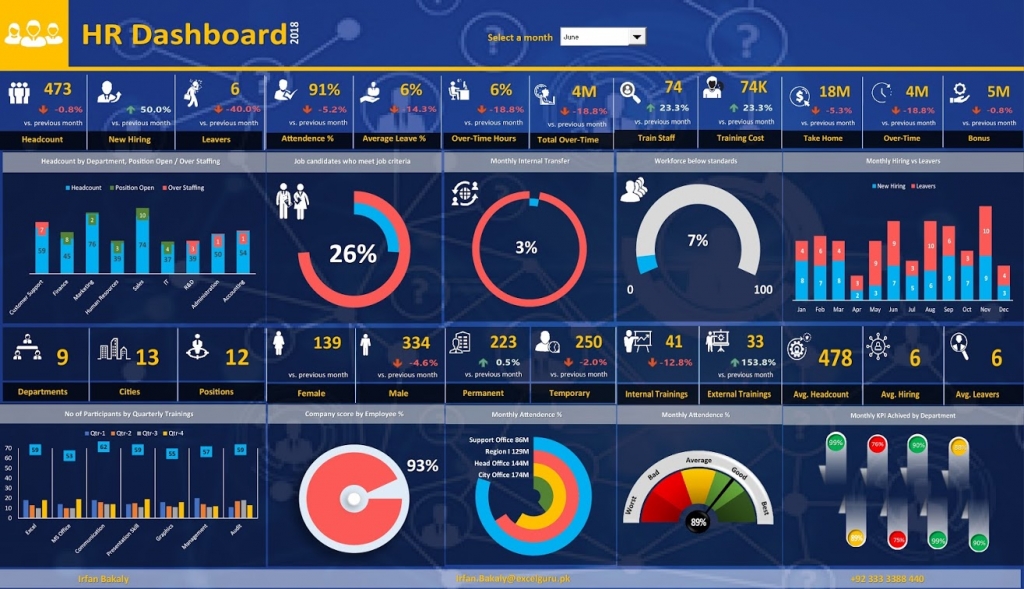
Employee performance metrics, attendance dashboards, bonus calculations.
Timeline tracking, budget vs. actual reports, and milestone monitoring.
In every case, the goal is the same:
Clear data. Faster insights. Smarter decisions.
If you're tired of struggling with complicated spreadsheets and unreliable formulas…
If you want a professional Excel dashboard that works flawlessly…
Message me today with a brief overview of your project.
Let’s turn your data into a powerful decision-making system.
Premium quality. Professional structure. Real business results.